Report any bugs with the Tickstory Lite software here. Please give as much detail as possible so the issue can be identified and resolved as soon as possible.
Hi - When exporting to MT4, there is a separate tab on the export screen called "MT4 Settings". This feature is explained in more detail under 'Customising MT4 Export Settings' in the manual:
Yes i know, i changed the Configs to my Broker configs...
But The script wont support Tick Value And Tick size 0.01!
They will change it after Export to 0, and i get an error: there is something wrong with your settings, if i look, they changed the settings to 0.
I'm not sure what you mean by "the script". See the attached screenshot - it shows how to set the Tick Size and Tick Value to 0.01 in the "Export to MT4" window. We have just performed an export with these values and then opened the FXT file with the Data Editor and everything appears correctly as 0.01.
If you are still having issues, you will need to give a detailed step-by-step explanation of what you are doing and what the problem is.
Ok i want to Export DAX30 (Ger30 Datas) to MT4. (Attachment first step)
Then i want to test and get an error, now when i want to RE-Export the Files, i get a Error Message.. its on german...
It means the Values are not correctly printed for Tick Size and Tick Value. (second)
if i accept that and watch in the export section.. (last one)
Now the Values are resetted.. dont know whats going on ..
Thanks for the further information, however it's still not clear where the error message shown in your 'second' screenshot are coming from. Is this being reported by your EA? Also, can you confirm that you are launching MT4 via Tickstory and that your FXT files are marked as 'read-only' when you view them in Windows Explorer (if not, can you please flag them manually as read-only immediately after export)?
hmm the problem is the Index!
I set manually the read-only button and starting after that MT4 with Tickstory!
Now i start a backtest, and get the attached Journal.
If i want to reexport the Files i get "second" error message again.
and the same window like "last one".
Tick value 0
Tick size 0.00000
dunno whats wrong here...
in EUR/USD the export is successfully!
Only the Index. There is no matter if i Map to another name or something. If i want to export and directly i click to export again i get directly the "second" error message...

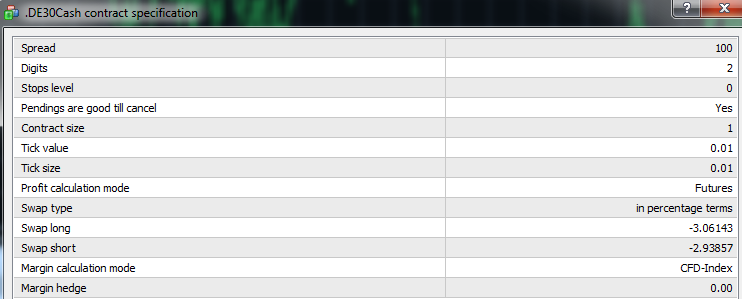
 ..
..