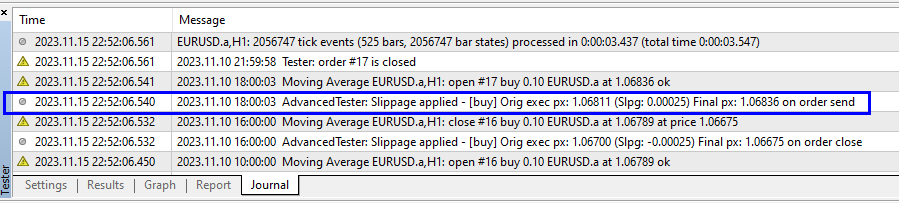
Metatrader 4 data does not natively support the concept of slippage in its testing environment. By default, the MT4 Strategy Tester will assume perfect execution at the stipulated trading price. Of course, in live trading this is not always the case and the price you specify on your order can be subject to a different execution price that is not in your favor - that is, slippage.
The Advanced Tester allows you to simulate slippage by specifying a minimum and maximum amount of slippage that can occur. The slippage amounts can even be negative, meaning that you can get slippage in your favor. The determination of how much slippage that is applied is random. The randomness is deterministic and based on the execution price of the trade. That is, if the same execution price appears, then the random number will be the same, ensuring that you get the same result in between identical testing runs.
Below are the steps required to test with simulated slippage. Expand each section for more details.

To enable slippage simulation for a specific terminal:
1. Start the terminal, if it hasn't been started already. 2. Select the terminal in the "Ready to Test' tab. 3. In the Custom Settings box, select the 'Slippage' tab and check 'Enable Slippage' .
|
To enable slippage simulation for a specific terminal:
1. Specify the Minimum and Maximum values (in points) that slippage can be (negative values represent favorable slippage). 2. Specify which types of orders to apply slippage on: ▪On Order Entry: When an order has entered the market ▪On Close Order: When the order has been closed. ▪On Take Profit: When the order has hit the Take-Profit (TP) target ▪On Stop Loss: When the order has the its Stop-Loss (SL).
|


You can now commence your test in the MT4 Strategy Tester. Within the Journal window, you will note additional information about the slippage that was applied to your order (if applicable).
|