Tick Data History Date is mess up !!!
Posted: Sun Feb 16, 2014 10:18 am
Hi,
I have downloaded Tickstory v1.3, upgrade my MT4 version to builds 604, and download Birt’s CSV2FXT script v0.46 binaries (released 09.02.2014, compatible: MT4 build 545 or higher). And i have the same version of MT4 builds 403 and Birt’s patch script v0.21 (updated 21.02.2012, compatible: MT4 build 225 – 409). Before explain my issue is, i need to explain the progress that i did, so you can understand them.
1. Now i use Tckstory software v1.3 to export to file, i select example GBPUSD and just change the from date and to date (2012.01.01 to 2013.12.31) and leave those setting as default. It successfully done this operation. OK.
2. Now i use Birt’s CSV2FXT script v0.46 to do the tick data conversion in MT4 builds 604, all the setting i follow from Birt instruction. No issue and successfully done this operation. Now i have FXT and HST files. OK.
3. Now i use Birt’s patch script v0.21 in MT4 builds 403, to remove 2GB limit and run the backtesting in offline mode, since the Birt script only support old version. I encounter the issue with

So i check the history data in MT4 >> FILE >> OPEN OFFLINE. Here it is...
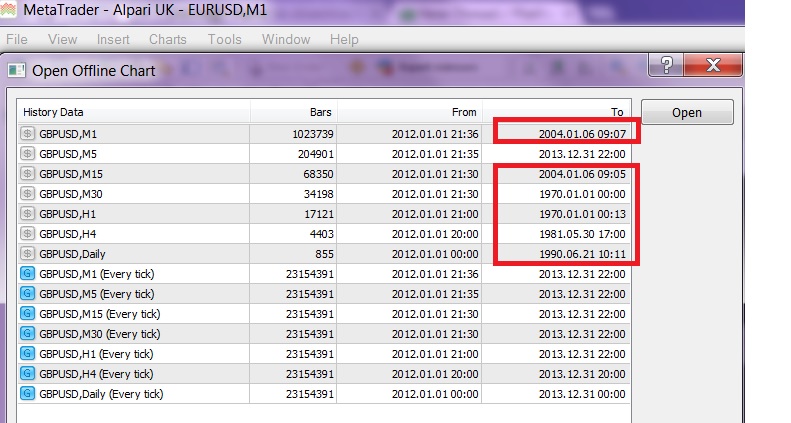
FYI. I have done the backtesting many times by using the old version TickStory, Birt script and MT4 version before. So no issue before, and i don't explain how i put those files (CSV, HST, FXT) into correct MT4 directory, i know where to put those files into new MT4 directory.
And i have done another experiment in order to prove whether is Birt Script or Tickstory new version error/bug/problem. In conclusion is the issue come from TickStory. Here is how i prove.
1. I erase all data in MT4 directory (CSV, HST & FXT)
2. I use TickStory v1.3. Change the MT4 setting, so it change to the new MT4 directory (C:\Users\Darren\AppData\Roaming\MetaQuotes\Terminal\DF5DE9547A0936C0E42C040D9AA40C5F) to put HST & FXT files.
3. I use "Export to Files" and select example GBPUSD and just change the from date and to date (2012.01.01 to 2013.12.31) and leave those setting as default. Now no issue for this operation and it successfully create the files. OK.
4. Now i cut those HST & FXT files into my MT4 builds 403 correct directory (Because need to remove 2 GB limit in backtesting)
5. I open up MT4 builds 403. Check the historical files at MT4>>FILE>>OPEN OFFLINE. Now it even show this...

So please assist !!
I have downloaded Tickstory v1.3, upgrade my MT4 version to builds 604, and download Birt’s CSV2FXT script v0.46 binaries (released 09.02.2014, compatible: MT4 build 545 or higher). And i have the same version of MT4 builds 403 and Birt’s patch script v0.21 (updated 21.02.2012, compatible: MT4 build 225 – 409). Before explain my issue is, i need to explain the progress that i did, so you can understand them.
1. Now i use Tckstory software v1.3 to export to file, i select example GBPUSD and just change the from date and to date (2012.01.01 to 2013.12.31) and leave those setting as default. It successfully done this operation. OK.
2. Now i use Birt’s CSV2FXT script v0.46 to do the tick data conversion in MT4 builds 604, all the setting i follow from Birt instruction. No issue and successfully done this operation. Now i have FXT and HST files. OK.
3. Now i use Birt’s patch script v0.21 in MT4 builds 403, to remove 2GB limit and run the backtesting in offline mode, since the Birt script only support old version. I encounter the issue with
So i check the history data in MT4 >> FILE >> OPEN OFFLINE. Here it is...
FYI. I have done the backtesting many times by using the old version TickStory, Birt script and MT4 version before. So no issue before, and i don't explain how i put those files (CSV, HST, FXT) into correct MT4 directory, i know where to put those files into new MT4 directory.
And i have done another experiment in order to prove whether is Birt Script or Tickstory new version error/bug/problem. In conclusion is the issue come from TickStory. Here is how i prove.
1. I erase all data in MT4 directory (CSV, HST & FXT)
2. I use TickStory v1.3. Change the MT4 setting, so it change to the new MT4 directory (C:\Users\Darren\AppData\Roaming\MetaQuotes\Terminal\DF5DE9547A0936C0E42C040D9AA40C5F) to put HST & FXT files.
3. I use "Export to Files" and select example GBPUSD and just change the from date and to date (2012.01.01 to 2013.12.31) and leave those setting as default. Now no issue for this operation and it successfully create the files. OK.
4. Now i cut those HST & FXT files into my MT4 builds 403 correct directory (Because need to remove 2 GB limit in backtesting)
5. I open up MT4 builds 403. Check the historical files at MT4>>FILE>>OPEN OFFLINE. Now it even show this...
So please assist !!