Page 1 of 1
Excel issue with tick export time stamp
Posted: Thu Jul 02, 2020 9:14 pm
by TradeBuilder
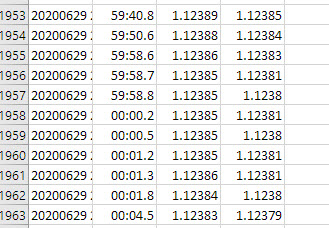
I exported AUDCAD ticks for two days to see the format TickStory produces. I used date, time, ask and bid price. The confusing field is time. It starts at 00:00.1 — which seems fine until I see 59:59:0 at the end of the day.
What am I looking at for time and why not a 24 hour per day time?
Re: Please explain tick export time stamp
Posted: Thu Jul 02, 2020 9:39 pm
by tickstory
Hi TraderBuilder,
That doesn't sound right. Are you sure you are not inadvertently using the "mm" specifier for the hour instead of 24-hour "HH"?
If you send us a screenshot of the format you are using we can assist further.
Thanks.
Re: Please explain tick export time stamp
Posted: Fri Jul 03, 2020 12:38 pm
by TradeBuilder
This is the setup and the result in An Excel spreadsheet:
- 2020-07-03_8-34-18.jpg (65.93 KiB) Viewed 10366 times
ZIP file with export attached
Thanks for having a look.
Re: Please explain tick export time stamp
Posted: Fri Jul 03, 2020 10:27 pm
by tickstory
Hi TradeBuilder,
Looking at the raw file you provided in a text editor, here are the actual last entries for the 29/6/20:
20200629 23:59:44,23:59:44.010,1.1238,1.12377
20200629 23:59:44,23:59:44.782,1.12381,1.12377
20200629 23:59:46,23:59:46.814,1.1238,1.12377
20200629 23:59:48,23:59:48.635,1.12381,1.12377
20200630 00:00:04,00:00:04.615,1.12381,1.12379
20200630 00:00:04,00:00:04.716,1.12382,1.1238
From this, it appears that there is some formatting issue in your Excel spreadsheet that you will need to fix.
Thanks.
Re: Please explain tick export time stamp
Posted: Sat Jul 04, 2020 1:42 am
by TradeBuilder
OMG! Thank you. My earlier file was too big to see in a text editor so I loaded it into Excel. Thank you.
Re: Please explain tick export time stamp
Posted: Sat Jul 04, 2020 2:07 am
by tickstory
You're welcome!
